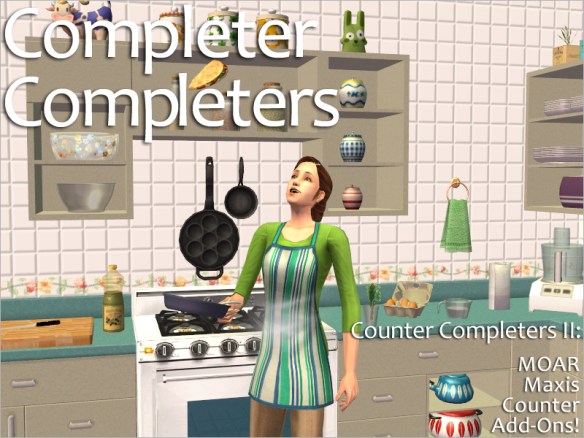
Completer Completers: MOAR Maxis Counter Add-Ons!

Category: Counters and sides: Surfaces -> Counters; wall cabinets and sides: Decorative -> Wall or Surfaces -> Shelves
Poly Count: Low poly to Medium poly
EPs Required: Varies

I’m still not at my best after Signe, but these have been finished for a very, very long time, so my uploading them is long overdue.

Backstory: Three years ago, in 2016, I made a set of Counter Completers – that is, add-ons for eight of the Maxis counters. It’s been one of my most popular downloads to date. Then, about a year ago (has it really been that long? Yikes!), the wonderful Croiduire very nicely asked me if I might consider making side pieces for the wall cabinets and counters with shelves, so they wouldn’t get eaten by the wall if you put them where two walls met. I thought this was a brilliant idea (much too brilliant for me to have thought of it myself; I’d noticed their being eaten, of course, but I couldn’t for the life of me figure out a good way around it), so of course I agreed. And that was all this set was going to be: sides. Quick and easy. Should be done in a day or so. Uh-huh.

But as I was making the sides, I thought I maybe should make a some more wall cabinets as well; just a couple of short ones, for the sake of completion. And maybe a couple of full-length ones, too. And I could make a couple of new counters as well. And maybe polish my old counters some. And… then things went rapidly downhill from there. πŸ˜›

So here you have a second set of counter completers – completer completers, if you’d like. πŸ™‚ As the name suggests these are meant to complement my first set, so if you haven’t downloaded it already, I really suggest you go and grab that one, too. (I’ve also updated some of the items in the first set – fixed some shadows and slot positions, and also did some remapping – so even if you have downloaded it before I’d still suggest you pop over there and get the updated set.)

Also, just so there aren’t any concerns or confusion, all of my counters work with drop-in sinks. (Yes, I know some custom counters don’t, but these do and have been thoroughly tested.)

Read more…

22 Scented Candle Recolours

Category: Lighting -> Table Lamps
EPs Required: Open for Business

Yes, there are lots of other things I’m working on, some that are almost ready for upload, but I just realised it’s been almost a year since I last uploaded something and more than four months since I made a post, so I thought I’d best put something out there lest someone I don’t know from Adam takes it upon themselves to declare that I’ve left the community never to come back or somesuch (this has happened before). πŸ™„ Besides, sometimes it’s nice to take a break from BHAVs and other complex things and just make something plain and simple, you know? Like recolours. πŸ™‚

Backstory: In early 2017, I made a couple of scented candles – as in, lights with snapdragon effects – loosely inspired by two IKEA ditto, BRÄCKA and SPRALLA (that I don’t think they sell any more). I quite like them and frequently use them in my own game, but I wanted some more, simmish recolours. So today I bring you twenty-two plumbbob and freezer bunny recols for my SPRALLA scented candle, all with patterns from Colourlovers. (Have I told you I love that site? I love that site!)

Read more…

Happy New Year!


Well, I had hoped to be much more active in 2018 than I have been. Don’t know where this year went, it just whooshed past, and there always seemed to be something to take time and/or spoons away from simming. 😦

But hopefully, this year will be better (seeing how I only posted one item in all of 2018, it’s not as if the bar is set high). I have a couple of things that are very close to being finished, one medieval and one not, that I hope to be able to get out the door… well, before 2020, at least. πŸ˜› And things that were high on my list for 2018 (that sword mod, publishing my medieval fantasy story…) are still high on the list for 2019.

Happy New Year, everybody! 🍸 Here’s to hoping it’s a good one, for all of us. ❀

PSA: About Animations and NPCs

Since this is a question I’ve been asked a few times, and also something I’ve seen come up on other sites:

None of my animated objects are controlled by NPCs!

 
Contrary to what seems to be popular belief, animated objects don’t always require an NPC to run; whether they do depends on the type and complexity of the object and not just on whether or not it’s animated. Objects that move around the lot, like Rebecah’s farm animals, usually need an NPC to work, but simple animated objects like mine, that rotate/swing/rock in place, do not.

But if any object of mine did spawn an NPC (which I say again, they do NOT), I promise you it would say so very, very clearly in the upload post. I know there are creators out there who like to foist undisclosed features upon their downloaders, but I’m not that kind of creator.

Training Dummies V. 3.0 – Now Also for Lefties!

Category: Hobbies -> Exercise
Poly Count: Canvas Low poly (980); Armoured Medium poly (1210); Invisible Low poly (12); Swords Low poly ( < 500)
EPs Required: Nightlife or above

UPDATE, 1 NOV 2019: By request, I’ve added a “no sword” option to the “Select Sword” pie menu, that lets your Sims fence with – you guessed it – no sword (or rather, with a tiny, invisible one). This in case you instead of my TSM swords want to equip your Sims with a handheld accessory, be it a different sword or something else entirely (wands, lightsabers, cucumbers…).

I’ve also cleaned up the interactions a bit (you no longer get the “watch” option if you click on the dummy while the active Sim is fencing, for one thing) + have fixed some mega bork with the child sword selection. Also fixed the swords so they actually work with v. 2.5, for those of you who have both versions. (Yeah, I was seriously sleeping on the job when I tested these. 😳 )

Please redownload if you want the updated versions!


I blame the fellow in the title pic for this. This wouldn’t have been necessary if it weren’t for him. He’s one of the main characters in my upcoming story – the first one you’ll meet, in fact (I know, I know, I’ve been talking about that danged story forever, but it’s getting close now!) – and he is, amongst other things, a pretty good swordsman. He’s also left-handed. Granted, he can use the sword just as well with his right hand, but when he can choose, he prefers his left. Which causes a bit of a problem when the sword-fighting happens on camera, since even though I can use my training dummies to stage it, all Sims fight right-handed with those.

Now, I’d never force a fellow lefty, pixellated or not, to use the right (or rather wrong πŸ˜‰ ) hand if he didn’t want to, so of course I had to update my training dummies for him. (Polished the swords some while I was at it, too.) So now your Sims can choose not just which sword to fight with, but which hand as well. Left-handed high-five!

BTW, all this has put me in a sword-fighting mood, so you know that sword mod I’ve been talking about? That’s what I’ll be doing… not next, I’ve got a request I need to see to first (that’s well under way, even though it’s kind of… I was going to say “snowballed”, but “avalanched” is probably a better description), but after that, there will be swords, yes, there will. πŸ˜€ (Just as a heads-up, I’ll probably need testers for it, but we’ll burn that bridge when we get to it.)

Read more…

PSA: Moving House

Or moving file hosts, at least. πŸ™‚

As you may have noticed if you’ve downloaded something from here recently, I’ve now joined many if not most creators in the community, and moved my files to Sim File Share.

“Silly Nix,” I hear you say, “why didn’t you do so before?” Because before, the SFS terms of use said that, if and when they closed down, they would rehost all your files, both public and private, on the Graveyard or wherever else they might see fit, and if you had a problem with this, you shouldn’t use SFS. (There was no way to opt out.)

Now, I have no problem with people doing whatever they dang well please with my files after I’ve left the community (which certainly isn’t anything I’m planning on doing any time soon, but you never know what may happen in the future, especially when you have medical issues), but as long as I’m active, I’ll be damned if I give Nysha or anybody else the right to decide where my files should or shouldn’t be uploaded. 😑 So I haven’t used SFS.

But now their ToU (yes, I know they’ve been up for a while, but I saw it only recently) say that they’ll only rehost public files, and to me this puts things in a different light. I do think SFS is a great idea for and service to the Sims community (show of hands, everybody who’s had their files removed by their file host because they haven’t been downloaded in six months? Or who’s had their host change their URLs, so you’ve had to edit every. single. gorram. link. on your blog? Yeah, me, too); it’s just the MTS-ish “you’re too stupid to make decisions about your own files” mentality I don’t care for. At all. But since private files are now exempt from rehosting (and I wasn’t planning on having my files and folders be public anyway), I felt I could start using SFS. So now I am.

This move won’t affect you, my downloaders, in any way, of course. The only difference is that you’ll be taken to a download page instead of having the files download directly, but since it’s like that for everybody who uses SFS, it’s nothing you haven’t encountered before. So download away! :mrgreen:

Happy New Year!


Image by Freepik

I know I haven’t been uploading much this year, and I’m sorry about that. This has been one of those years when RL has been interfering with my simming more than I’d have liked. Often, I just hadn’t had the spoons for both RL stuff and Sim stuff – and no matter how badly I wish it didn’t, RL stuff has to come first. Which means less Sim stuff.

But hopefully, there will be more spoons in 2018 – and more downloads for you. πŸ˜‰ I do have things planned, lots of things (and if you know me at all, you know there’ll be unplanned things as well). A certain sword mod is very high on the agenda (Charity, if you’re reading this, you know what I mean).

I also hope to start releasing this medieval fantasy story I’ve been poking at, but then again I’m an even slower writer than I am creator, so it might very well be 2020 before that happens. πŸ˜›

Happy New Year, everybody! ❀

REQUESTED: Bella Statue, Floor Version


Thanks to Colin Hay for the title.

Category: Decorative -> Sculpture
EPs Required: None – base-game compatible
Cost: $1500
Poly Count: Medium poly (1982)

A while back, downloader Joke Dam asked for a life-size (well, life-size for Sims) version of my Bella table statue, “so Mortimer Goth could have one hidden at his attic”. I thought this was a great idea – I mean, it’s not just Mortimer, every Sim home ought to have a statue of Bella, right? So, as requested, I made one. πŸ™‚

Read more…

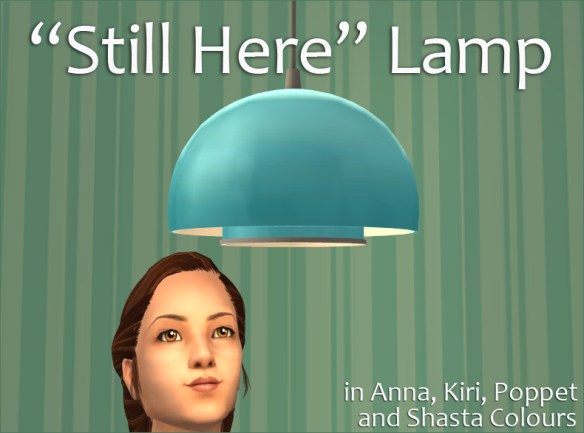
“Still Here” Lamp


Category: Lighting -> Ceiling Lamps
Cost: $95
Poly Count: Medium poly (1160)
EPs Required: None – base game compatible

First of all: I’m NOT on hiatus and I’m NOT inactive! I’m very much active and I am working on stuff, on several stuffs – but a lot of it is pretty complex stuffs, and complex stuff takes time (at least if you care about pesky little things like not crashing people’s games). So I thought I’d best make a lamp to show that I’m, you know, still here, before someone I don’t know from Adam decides to be “helpful” and proclaims that I’ve left the community forevah, or somesuch. πŸ™„ (Yes, this has actually happened in the past.)

Anyway. The “Still Here” lamp is loosely based on a ceiling lamp that one of my neighbours has in their kitchen. (No, I don’t spy on my neighbours, honest, but the apartment buildings aren’t very far apart where I live.) It come in no less than four different palettes: Anna’s colours, Kiri’s Colour Surge a.k.a. the MLC palette, Poppet’s Lonesome and Shasta’s Yeti palette. All in all, that’s 78 recols, so I’m sure you’ll find something that catches your fancy. πŸ˜‰

Read more…

For Nonni: Four Rocking Cots

Category: Misc. -> Children
Poly Count: Medium poly to High poly!
EPs Required: Free Time, Seasons

Well. These have been a long time coming, to say the least. They were supposed to be posted already during Toddler Month in July, but that didn’t happen for various reasons. At the time I thought it would be no big deal if I uploaded it in early or mid August instead… but then Nonni died. πŸ˜₯ Nonni wasn’t just a dear friend, she was also one of my most faithful and frequent commenters and had been following this blog from the start. This upload was something I knew she would have liked (she loved the toddlers in game), and I had been greatly looking forward to getting her enthusiastic comments on it… so I needed some time to adjust to her being gone before I was emotionally ready to post it. (I always knew I was going to post it, though; my shelving it on her behalf would have been the last thing Nonni would have wanted.) Then, of course, I had to go on hiatus on a bit for health reasons… so yeah. Time passed.

But now they are finally here: Four rocking cots for your littlest Simlets. For Nonni. ❀

Read more…

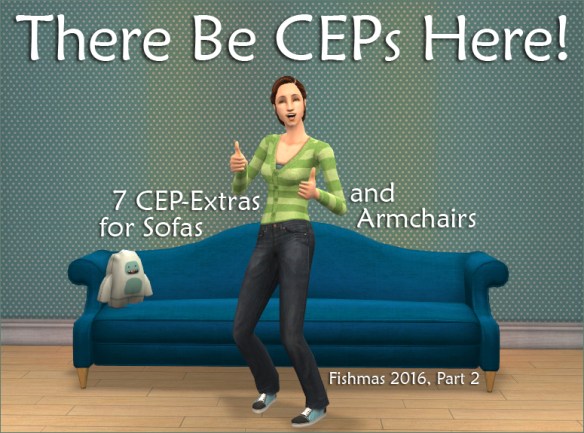
Seven CEPs for Sofas and Armchairs

There Be CEPs Here!

This is the second part of my gifts for the for the 2016 Fishmas Advent Calendar at leefish.nl. This was fulfilling a gift from a certain Yeti: CEPs! πŸ˜€ The humble Yeti only wanted CEPs for the Luxiary King Armchair and the Sofa of Substance, but as I was making those, I realised there were several other sofas and armchairs, that only had one subset but really ought to have two… and since I was already in full CEP swing, I decided to do something about that. πŸ˜‰ (I did look around first, though, to make sure nobody had made CEPs for them already – “nobody” meaning HafiseAzale and HugeLunatic, since they are my most trusted CEP makers. That’s why I didn’t make a CEP for e.g. the Futonesque Fantasy Sofa – Hafi already did that.)

The result was no less than seven CEPs: for the Luxiary King Armchair and the Sofa of Substance as per Yeti request, and also for the Contempto Good Livin’ Chair, the Blue Suede Chair, the Glassic Chair, the Satinistics Loveseat and the UNI Wornable Sofa (since that one’s basically the Sofa of Substance, only… worn).

Read more…

2016 Fishmas Gifts

Fishmas Gifts 2016

Feel like some more candles? πŸ˜›

These are my gifts for the 2016 Fishmas Advent Calendar at leefish.nl. I know not everybody frequent that site, so I’m going to share them here as well, now that the creators of the gifts at long last have been revealed over there. πŸ™‚

I actually made four gifts for the Advent calendar, but the fourth one, which was fulfilling a wish, will be in a separate post. (You’ll understand why when you see it.)

You’ll find a download button after each gift, but there will also be one at the very end of the post, in case you want to download all of them in one swoop.

Merry Fishmas! :mrgreen:

Read more…

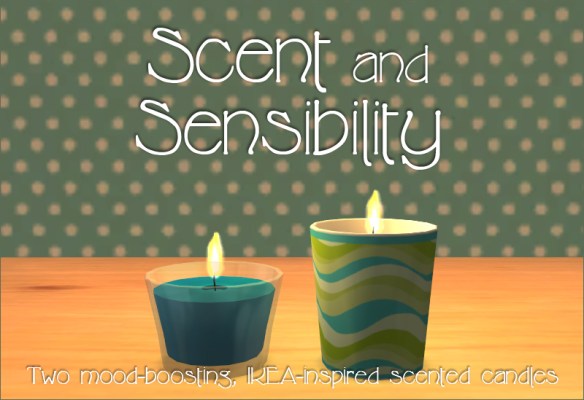
Mood-Boosting Scented Candles

Mood-boosting Scented Candles

Category: Lighting -> Table Lamps
Cost: $15 (in glass), $25 (in pot)
Poly Count: Low poly (glass 668, pot 380)
EPs Required: Open for Business

Well, she said, I’m back. πŸ™‚ I hope 2017 has been treating you well thus far; I know 2016 was a rough year for far too many of us. Here’s to hoping this will be better one for all – the only way is up, amirite?

So let’s start the simming year off with an upload that’s bound to lift your spirits – if you’re a Sim, at least. πŸ˜‰ My first upload of 2017 is two kinds of scented candles, inspired by IKEA’s BRÄCKA and SPRALLA candles. And for Sims, they’re scented for real. :mrgreen:

Read more…

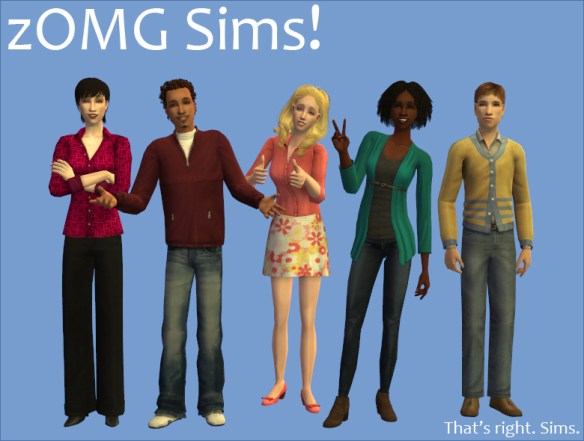
Five Sims

zOMG Sims!

“Um, Nix?” I hear you say. “What are you doing? You don’t make Sims; you make stuff for Sims.” And right you are, for the longest time, I didn’t make Sims other than for my own game (and those Sims usually just looked like a blend between Face 1 and Face 2, because, well, that’s exactly what they were πŸ˜› ). But then, a few months back, I made a decision to change the way I play my main game – that is, my contemporary game with all the Maxis ‘hoods and premades. For one thing, I decided to go fully Maxis Match with it; I’ve always preferred the Maxis look to super-realistic, photoskinned ones, but even so my game had been a mix of Maxis, semi-realistic and realistic stuff, and I wasn’t really happy about it. So Maxis Match all the way it was. I also decided to put much more effort into my Sim-making, and try to give my Sims more varied features (and downloaded a ton of new non-default face templates to help me) instead of just slapping different skin tones and hairs on what was basically the same Sim over and over, like I’d been doing thus far.

And these five Sims are the result of this revival.  πŸ˜€ (Well, not just these five, but these are the ones I like well enough to upload, anyway.)

Read more…

Counter Completers: Add-ons for Eight Maxis Counters

Counter Completers

Category: Counters: Surfaces -> Counters; wall cabinets: Decorative -> Wall or Surfaces -> Shelves
Poly Count: Low poly to Medium poly
EPs Required: Varies

UPDATE 16 OCT 2019

 
With the release of my second set of counter completers, I’ve taken the opportunity to update several of the items in this set. All of the updates have been added to the main download.

If you’ve downloaded this set before 16 Oct 2019, I recommend you download it anew; just let the files overwrite the ones you’ve already got. (I did contemplate making a separate download with just the updates but eventually decided against it, partly because I don’t trust myself not to miss adding something, partly because I don’t want to confuse people more than necessary. Sorry about any inconvenience this might cause return downloaders in particular!)
 

The following items have been updated:

Value: Fixed counter shadows so they better match those of the Maxis Value counter, and changed the wall cabinet shadows accordingly. Also remapped the inside of the counters with shelves to the side of the counter, to make it painted instead of plywood (have updated the screenshots to reflect this).

Epikouros: Fixed shadows to match the Maxis ones (haven’t updated the screenshots to reflect this, but you can see the new shadows on the counters from my second set).

Castanoga: Deleted the middle slots on the shelves for the shelves+door and door+shelves wall cabinets (anything you put in those slots would just end up behind the door frame anyway), and also moved the other slots so they’re centred better in relation to the doors.

Blue Ribbon: Removed the inside shadow from the wall cabinets (not sure why I thought it was necessary in the first place). Have not updated the screenshots to reflect this.

Double Wood: Remapped the inside of all wall cabinets with shelves so they’re mapped to the side of the counter instead of to the tiny, dark texture patch Maxis had mapped the inside of the counter to (have updated the screenshots to reflect this).

OMSPs: Fixed the invisible recol so it sticks if you recolour them with the design tool when on an occupied lot. Also added a menu option to make all counter OMSPs visible/invisible simultaneously.

 
Also, just so there aren’t any concerns or confusion, all of my counters work with drop-in sinks. (Yes, I know some custom counters don’t, but these do and have been thoroughly tested.)


This project is something I’ve been working on on and off for well over a year. It all started when I was furnishing a kitchen for one of my Sims, and thought the K&B Surfaco counter would be great for his style… except the Surfaco is one of those counters who has only one variation, with doors, and that looked a bit boring to me. Too boring.

Around the same time, Kiri over at leefish.nl made some great add-ons for the Value counter, and iCad released a ton of counter recolours at her Tumblr. All together this put me in a counter productive mood (bad pun, go stand in the corner!), and it got me thinking. Maybe I should make some add-on counters for those poor, neglected doors-only ones? Just one or two, for the Surfaco and maybe for the Value counter as well (“the single most useful counter in the repertoire,” in Kiri’s words)?

“Just one or two,” yeah, right. πŸ˜› Somehow, I ended up making add-ons for no less than eight in-game counters: Value, Epikouros, Blue Ribbon, Forbidden Fruit, Castanoga, Surfaco, Neo-Quartzo and Double Wood. And just as I thought I was finished? I realised the walls in my test Sim’s kitchen were looking awfully bare – so I made some wall cabinets as well. (Yes, I know that CTNutmegger at MTS made wall cabinets already back in 2009, and they’re great, but as a matter of personal preference there were details I wanted done differently. Besides, it seemed a bit silly for me to say that “you can have all these new counters, but if you want wall cabinets to go with them you’ll have to get them from a completely different creator at a completely different site”. I’ve sometimes used CTNutmegger’s wall cabinets as inspiration, but I haven’t cloned mine off hers and I have not used her meshes as bases for mine.)

Read more…